Developer API – Accessory Items & Slot Types
This page explains how accessory items and slot types work together in CuriosPaper, and how to use the API to:
- Define what items count as accessories.
- Bind items to specific slot types (
head,back,ring, etc.). - Validate and inspect slot metadata.
- Build your own systems (stats, passives, abilities) on top of accessories.
If you haven’t read the Quickstart and Configuration / Slots & GUI pages yet, do that first – they explain how slots are defined in config.yml.
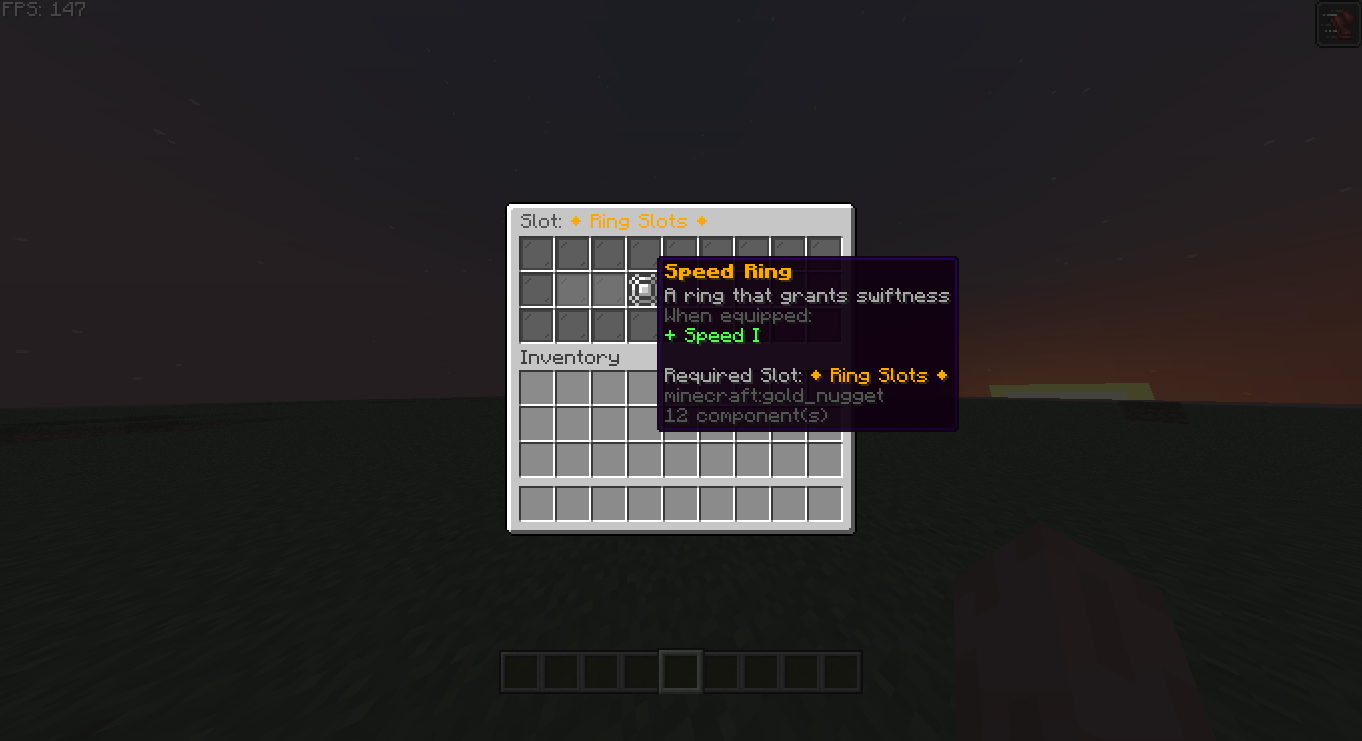
1. Slot Types – The Core Concept
Every accessory in CuriosPaper is tied to a slot type ID, which is just a String matching a key under the slots: section of config.yml.
Example config.yml:
slots:
  head:
    name: "&e⚜ Head Slot ⚜"
    icon: "GOLDEN_HELMET"
    item-model: "curiospaper:head_slot"
    amount: 1

  ring:
    name: "&6◆ Ring Slots ◆"
    icon: "GOLD_NUGGET"
    item-model: "curiospaper:ring_slot"
    amount: 2

  charm:
    name: "&d✧ Charm Slots ✧"
    icon: "EMERALD"
    item-model: "curiospaper:charm_slot"
    amount: 4
From the API’s perspective, the important pieces are:
- Slot IDs:
"head","ring","charm", … - Slot amounts:
amount(how many slots of that type a player has).
These are what you pass into API methods as String slotType.
2. Getting Slot Types from the API
You can query which slot types are currently configured:
List<String> slotTypes = curiosApi.getAllSlotTypes();

for (String type : slotTypes) {
    getLogger().info("Curios slot type: " + type);
}
This is useful when:
- You want to dynamically support whatever the server owner configured.
- You’re writing generic systems (e.g., “apply bonuses for all slots”).
3. Tagging Items as Accessories
To make an item equippable in a particular slot type, you tag it.
ItemStack base = ...; // Your custom item
String slotType = "necklace"; // MUST match config.yml

// Add Curios metadata so the item becomes a valid accessory
ItemStack tagged = curiosApi.tagAccessoryItem(base, slotType, true);
Parameters:
base– originalItemStack.slotType– slot ID, e.g."head","back","ring","charm"or a custom one you added toconfig.yml.true– whether to add the “slot lore” line, if enabled infeatures.add-slot-lore-to-items.
The returned tagged item:
- Carries internal metadata so CuriosPaper knows its slot type.
- Will only be equippable in appropriate Curios slots.
- Can be recognized by other plugins using the API.
4. Inspecting Slot Type from an Item
You can check which slot an item belongs to:
String slotType = curiosApi.getAccessorySlotType(itemStack);

if (slotType != null) {
    player.sendMessage("This is a Curios accessory for slot: " + slotType);
} else {
    player.sendMessage("This item is not a Curios accessory.");
}
This works for:
- Items you created.
- Items created by other plugins that use CuriosPaper.
5. Validating Slot Types & Accessories
Before doing anything serious, validate:
Check if a slot type exists
boolean exists = curiosApi.isValidSlotType("ring");
if (!exists) {
    getLogger().warning("Config does not define 'ring' slot!");
}
Get slot capacity
int ringSlots = curiosApi.getSlotAmount("ring"); // e.g. 2
Validate an item for a given slot
boolean valid = curiosApi.isValidAccessory(itemStack, "ring");

if (!valid) {
    player.sendMessage("§cThat item cannot be equipped in the ring slot.");
}
Use these checks in:
- Custom GUIs.
- Command handlers.
- Custom equip logic or stat calculators.
6. Recipes: Common Patterns
Recipe 1 – Grant a Starter Accessory
Give a player a “Starter Charm” that goes into the charm slot:
public void giveStarterCharm(Player player, CuriosPaperAPI curiosApi) {
    ItemStack base = new ItemStack(Material.EMERALD);
    ItemMeta meta = base.getItemMeta();
    meta.setDisplayName("§dStarter Charm");
    base.setItemMeta(meta);

    ItemStack charm = curiosApi.tagAccessoryItem(base, "charm", true);
    player.getInventory().addItem(charm);
}
Recipe 2 – Only Allow Specific Items in a Slot
If you want to restrict accessories further than “slot type”, combine tagging + your own checks.
Example: Only allow custom-named rings in the ring slot:
public boolean isAllowedRing(ItemStack item) {
    if (item == null || !item.hasItemMeta()) return false;
    ItemMeta meta = item.getItemMeta();
    if (!meta.hasDisplayName()) return false;
    String name = meta.getDisplayName();

    return name.contains("§6Ring of") || name.contains("§bRare Band");
}

@EventHandler
public void onAccessoryEquip(AccessoryEquipEvent event) {
    if (!"ring".equalsIgnoreCase(event.getSlotType())) return;
    if (event.getNewItem() == null) return;
    if (!isAllowedRing(event.getNewItem())) {
        event.setCancelled(true);
        event.getPlayer().sendMessage("§cYou cannot equip that ring.");
    }
}
Recipe 3 – Give Bonuses Based on Slot Type
React to all accessories in a particular slot, regardless of which items they are.
Example: Each charm gives +1 max health:
public void applyCharmBonus(Player player, CuriosPaperAPI curiosApi) {
    List<ItemStack> charms = curiosApi.getEquippedItems(player, "charm");
    int bonus = charms.size();

    // apply bonus via your own stat system / attributes
}
You could call this:
- On login.
- On equip/unequip (
AccessoryEquipEvent). - On periodic stat recalculation.
7. Accessory Items vs “Normal” Items
CuriosPaper does not stop other plugins or vanilla from creating random items. How does it know which ones are accessories?
An item is treated as a Curios accessory if:
- It has been tagged by
tagAccessoryItem, or - Another plugin marked it using internal Curios metadata.
Any item without this metadata:
- Won’t appear in Curios slots.
- Won’t be equippable through the Curios GUI.
- Won’t be returned by
getEquippedItems, etc.
8. Dynamic Slot-Aware Logic
If you want your addon to adapt to any config, don’t hardcode slot IDs.
Example: Show a summary of all accessories, grouped by slot:
public void showAccessorySummary(Player player, CuriosPaperAPI curiosApi) {
    List<String> slotTypes = curiosApi.getAllSlotTypes();

    player.sendMessage("§8[§dCurios§8] §7Your accessories:");
    for (String slotType : slotTypes) {
        int count = curiosApi.countEquippedItems(player, slotType);
        if (count <= 0) continue;

        player.sendMessage("§f- " + slotType + ": §a" + count);
    }
}
This keeps your plugin compatible even if server owners:
- Add custom slot types.
- Rename or remove defaults.
9. Anti-Patterns (What Not to Do)
Don’t do this trash:
❌ Hardcoding assumptions like “ring slots always exist and are 2”: Use isValidSlotType("ring") and getSlotAmount("ring").
❌ Manually editing Curios NBT or persistent data: Always use the API (tagAccessoryItem, etc.), or you’ll break compatibility.
❌ Assuming an item is valid just because it looks like one: Always validate with isValidAccessory(item, slotType).
10. Summary
- Slot types are string IDs from
config.ymlunderslots:. - Accessories are
ItemStacks tagged viaCuriosPaperAPI. - Use
tagAccessoryItem,getAccessorySlotType,isValidSlotType,isValidAccessory, andgetSlotAmountto work safely. - Build your own logic on top of slots and accessories – CuriosPaper just handles storage, rules, and GUI.