Features & Debug
This section covers all optional behavior toggles that modify how CuriosPaper interacts with players, accessories, GUIs, and sounds.
Below that, you’ll find the Debug section, which is essential for troubleshooting issues, testing the plugin, or developing addons.
⚙ Features Config Section
features:
  add-slot-lore-to-items: true
  allow-elytra-on-back-slot: true
  show-empty-slots: true
  play-gui-sound: true
  gui-sound: "BLOCK_CHEST_OPEN"
  play-equip-sound: true
  equip-sound: "ENTITY_ITEM_PICKUP"
  play-unequip-sound: true
  unequip-sound: "ENTITY_ITEM_PICKUP"
Each option allows you to customize a player-facing feature of CuriosPaper. Below is a full explanation of each toggle.
✨ Feature Toggles
🏷️ add-slot-lore-to-items
add-slot-lore-to-items: true
When enabled:
- Items tagged as accessories automatically receive a lore line describing which slot they belong to.
Example:
“§7Accessory Slot: Necklace”
Useful for servers where players frequently trade or inspect accessory items.
Recommended:
✔ Most servers ❌ Disable only for extremely clean/no-lore item designs
🪽 allow-elytra-on-back-slot
allow-elytra-on-back-slot: true
When enabled:
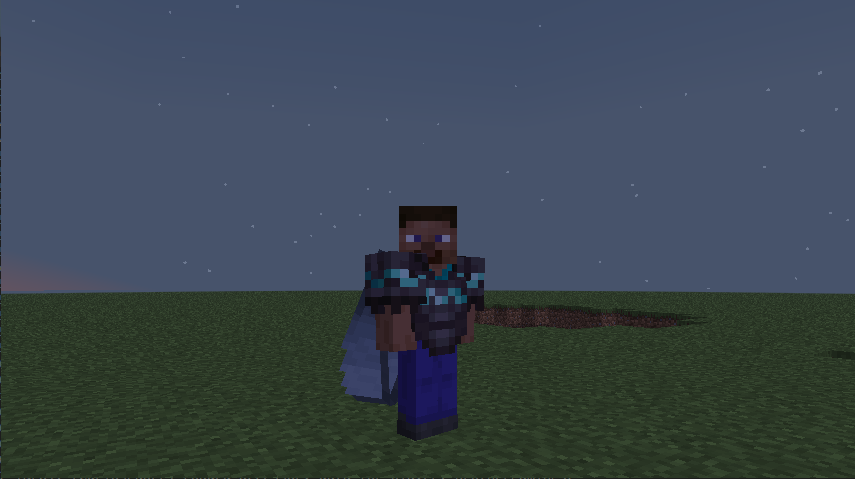
- Actual Elytras can be equipped into the back slot instead of the chestplate slot.
- CuriosPaper applies correct gliding behavior automatically.
- Elytra durability & damage rules still apply unless overridden by plugins.
This option is essential for RPG-style servers where players want:
- Backpacks
- Capes
- Jetpacks
- Cloaks
- Elytra + Chestplate combos
🔲 show-empty-slots
show-empty-slots: true
Controls whether empty slot icons appear in the GUI.
If disabled:
- Slot-type menus only show filled accessory slots.
- Cleaner but less user-friendly.
If enabled:
- All slots are visible even if empty.
- Great for clarity and teaching players how many slots they have.
Recommended:
✔ Enabled for public servers ❌ Disabled for minimalistic hardcore servers
🔊 play-gui-sound
play-gui-sound: true
gui-sound: "BLOCK_CHEST_OPEN"
Plays a sound when players open the accessory GUI.
- Immersive feedback
- Helps reinforce input actions
- Can be themed via resource packs
Use any valid Minecraft sound key.
🎵 play-equip-sound / play-unequip-sound
play-equip-sound: true
equip-sound: "ENTITY_ITEM_PICKUP"

play-unequip-sound: true
unequip-sound: "ENTITY_ITEM_PICKUP"
Adds subtle audio feedback for:
- Equipping accessories
- Removing accessories
- Swapping accessories
Tips:
- Change equip sound to
"ENTITY_ARMOR_EQUIP_DIAMOND"for more dramatic effects - Use
"BLOCK_NOTE_BLOCK_PLING"for fantasy-style RPG soundscapes - Use
"NONE"(empty string) to disable specific sounds
🐞 Debug Configuration
Debug settings help diagnose issues with slot handling, API calls, and inventory interactions. These settings should NOT be used on production servers unless resolving an issue.
🧪 Debug Config Block
debug:
  enabled: false
  log-api-calls: false
  log-inventory-events: false
  log-slot-positions: false
Each toggle provides visibility into a different part of the plugin’s internal behavior.
🟡 enabled
enabled: false
Master switch for enabling ALL debug logs.
Set to true only when:
- Investigating bugs
- Developing addons
- Testing custom slot behaviors
- Debugging resource pack issues
📜 log-api-calls
log-api-calls: false
Logs every time another plugin uses CuriosPaper’s API:
- Accessory equip/remove
- Slot queries
- Item tagging
- Resource pack injections
Useful for:
- Developers building addons
- Monitoring API misuse
- Finding plugin conflicts
🧰 log-inventory-events
log-inventory-events: false
Logs:
- Clicks inside CuriosPaper GUIs
- Hotbar swaps
- Drag actions
- Shift-click operations
- Canceled inventory actions
This is extremely useful for diagnosing:
- Why a player cannot equip an item
- Plugin conflicts with inventory listeners
- Duplication protection systems
📐 log-slot-positions
log-slot-positions: false
Outputs debug information about GUI slot arrangement:
- Pattern application
- Slot-index calculations
- Visual layout mapping
Enable this when:
- Adjusting the GUI patterns
- Debugging strange visual placements
- Testing custom slot counts
✔ Recommended Debug Settings
For normal servers
enabled: false
log-api-calls: false
log-inventory-events: false
log-slot-positions: false
For plugin developers working with CuriosPaper
enabled: true
log-api-calls: true
log-inventory-events: true
log-slot-positions: false
For GUI layout testing
enabled: true
log-slot-positions: true
For bug reports
Ask players to set:
enabled: true
log-api-calls: true
log-inventory-events: true
📌 Summary
| Setting | Description |
|---|---|
add-slot-lore-to-items | Show accessory slot info on items |
show-empty-slots | Show or hide empty slots in menus |
allow-elytra-on-back-slot | Enables Elytra in back slot |
play-gui-sound | Sound when opening GUI |
play-equip-sound | Sound when equipping |
play-unequip-sound | Sound when unequipping |
debug.enabled | Master debug switch |
log-api-calls | Logs external plugin API usage |
log-inventory-events | Logs GUI interactions |
log-slot-positions | Visual layout debug |
CuriosPaper includes powerful feature toggles and debugging tools allowing fine-grained control, customization, and visibility — critical for stable public servers and addon developers.